The content board, end to end
This is the whole of the system behind my Workbench Content tab: where the ideas come from, what fires when a card moves, and every rule a draft has to clear before I see it. Nothing here is secret and all of it is copyable. At the bottom there is a prompt that builds your own version, in four steps rather than all at once.
Three ways an idea gets onto the board
Two of them are me. The third runs while I am asleep, and it is the only one that has to prove itself before I ever see the result.
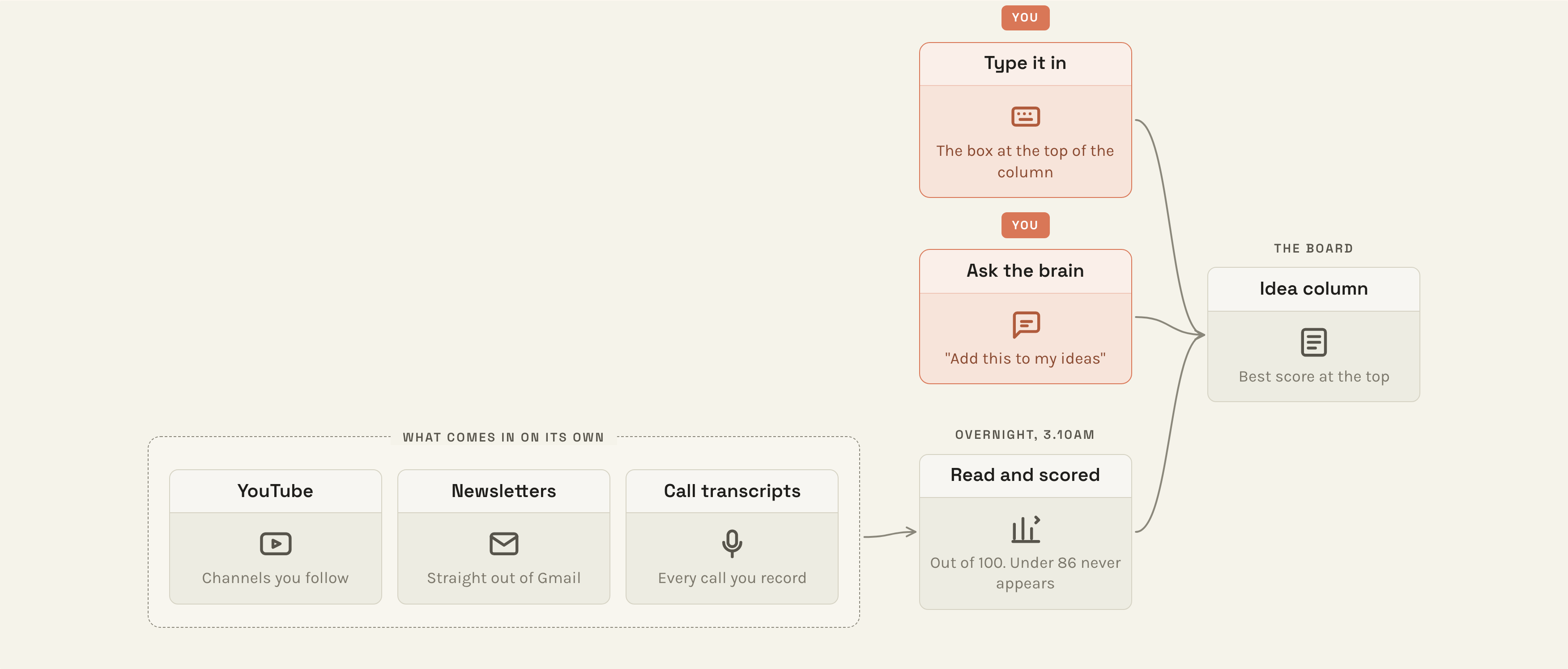
The box at the top of the Idea column. This is what I use when something occurs to me on a walk.
Say "add that to my ideas" in an ordinary conversation with your brain. Best when you have just worked something out together.
A job reads yesterday's YouTube, newsletters and call transcripts, writes ten to twenty possible posts, and scores each one.
Anything scoring 85 or below is hidden before the page loads. No card, nothing to dismiss, no decision for me to make.
The part I would steal first. The cheapest thing a system can do for you is not show you the bad options. The score is one number in one file and the filter is one line. Everything else on this page is optional next to that.
Only three things feed the overnight job, and that is deliberate: the YouTube channels I follow, the newsletters that arrive in Gmail, and the transcript of every call I record. It also reads the last thirty days of my own posts, so it stops suggesting things I have already written.
None of this arrived at once. The newsletters came first, on their own, because I was drowning in them. YouTube came months later. Call transcripts went in about six weeks ago, and only because I noticed my best posts were coming out of conversations rather than reading.
What actually fires when you drag a card
The five columns are just folders. The work happens on the arrows, which is the bit you cannot see by looking at the board.

Drafting, Approved and Scheduled are three folders on my Mac. Dragging a card moves the file between them. Nothing is stored inside the board, so I can open any of it in any other app, and if I stopped using the board tomorrow every post would still be exactly where it was.
-
Idea → Drafting
Letting go of the card opens a second session on my other screen. It already has the idea, my tone guide, and the instruction to write the post and check its own work. I type nothing. A few minutes later a real draft appears in the Drafting column and the idea disappears.
Being straight about it: roughly a third of what comes back gets binned. That is fine, because binning one costs ten seconds.
-
Drafting → ApprovedYou
The busiest move. Three things happen in order. First it saves your edited text, before anything reformats it, because the next step has to learn from your words and not from our formatting. Then it converts the post to whatever the platform actually wants: LinkedIn is not markdown, so bold markers become real bold characters rather than a row of asterisks.
Then it opens a session that compares the draft it gave you against the version you approved, and comes back with rules it thinks it should learn. Usually I say no, that was a one-off. Every so often it has caught something real, and that rule is in the tone guide permanently and no future draft repeats the mistake.
-
Approved → ScheduledYou
One button. It puts the post on my clipboard formatted the way the platform wants, strips the production notes off the top so they never travel, moves the card, opens the new-post box in a tab, and drops any images onto my desktop where I can drag them in.
That saves about four seconds. I mention it because a lot of people think automation has to be worth an hour before it counts. It does not. It has to annoy you twice.
-
Scheduled → Published
A plain file move, filed by platform. The column only ever shows the last seven days, so it stays a record of recent work rather than an archive.
One trap worth knowing. Plain Save writes the file and does nothing else, so it is safe halfway through an edit. Save and Approve saves and moves, which fires everything above. Those are two buttons because I assumed for months that Save meant approved.
Seven checks, before I ever see the draft
Six of them are scores out of a hundred, each with its own pass mark. The seventh is not a score at all, it is a veto.
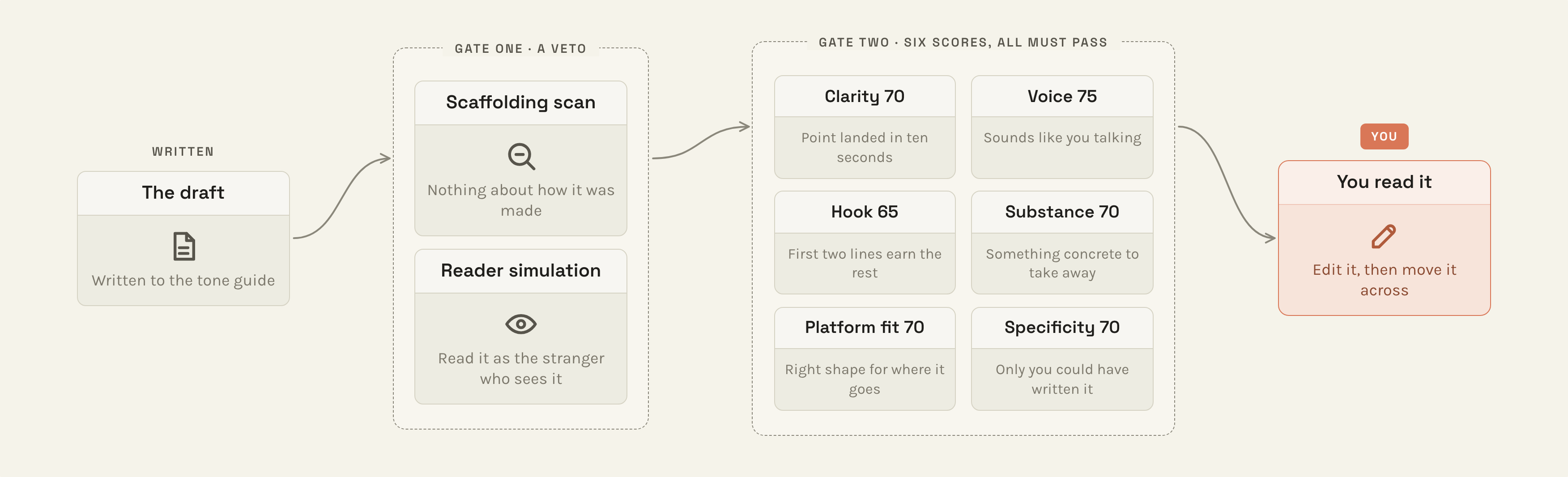
The veto reads the post as a stranger scrolling past it, and asks whether anything in it gives away how it was made. A draft that mentions the transcript it came from, or leaves a note to me in square brackets, dies there, and the six scores never run. I added that after a draft came back containing the words "the bit worth posting", which is a note to me, not a sentence for a reader.
Then the six. Any single one below its mark fails the whole post, and only the failing one gets rewritten, so fixing the hook cannot break the clarity. Three attempts, then I see the best version with its scores.
What it is actually reading
Words I never use. One hit fails the draft, no argument.
Stock AI openers, the "let me unpack that for you" family.
Figures of speech. A reader translating an idiom is not reading.
Words that are fine in English and wrong the way the machine uses them. A warning, not a ban.
Not one of those entries was written in advance. Every single one is there because I read a draft, hated a word, and said so. The idiom list started at twelve.
Every rule, written out and split up by which check applies it, is here:
The evaluators: every rule, by evaluator
Build your own, in four steps
You already have the board. Your Workbench Content tab has the same five columns, the same idea box, and the same drag-an-idea-to-Drafting. What you do not have yet is your own rules, the checker that reads them, or the learning step.
So this prompt builds those, in order, and stops after each one. Start with step one and use it for a week before you ask for step two. Do not ask for all four at once and then judge the result: the version on this page took a year, and every part of it exists because something annoyed me twice.
I want to build a content system in my brain, working with the Workbench Content tab I already have. I have just watched Mike's video about his version and I want my own, built in the order below rather than all at once.

Read these before you do anything, and do not improvise around them:
- .claude/skills/write-post/SKILL.md, the drafting skill I already have
- .claude/skills/write-post/references/post-writing-guide.md, its formatting rules
- tools/members/command-centre/lib/content-board.cjs, how my board actually reads and moves files
- Any posts already in content/posts/. These are the best evidence of how I actually write

Then build STEP ONE ONLY, and stop.

STEP ONE: my rules file.

Create context/my-writing-rules.md. It holds four lists and nothing else:
- Banned words. Words I never want to see, where one hit fails the draft.
- Banned phrases. Stock AI openers and constructions.
- Idioms. Figures of speech to say plainly instead.
- Watchlist. Words that are fine in English but wrong the way you keep using them. These are warnings for me to read in context, never automatic fails.

Do not invent this list from general advice about AI writing. Build it from evidence:
1. Read every post already in content/posts/ and anything else of mine you can find in this brain. Tell me what you notice about how I actually write: sentence length, how I open, whether I use contractions, whether I swear, how I close.
2. Then ask me, one question at a time, no more than eight questions total: the words I hate seeing in my own writing, the ones I hate seeing in AI writing, whether I write as I or we, whether em dashes are allowed, and anything I want banned outright.
3. Write the file from my answers plus what you found. Every entry gets a one-line reason next to it, so that six months from now I can tell whether I still agree with it.

Then add a short block to my root CLAUDE.md pointing at context/my-writing-rules.md and saying it must be read before writing anything in my voice.

Stop there. Show me the file, open it in my browser as HTML so I can read it properly rather than as raw markdown, and tell me the exact sentence to send you when I want step two. Do not build steps two, three or four now, and do not tell me to run any commands myself. You run everything.

For reference, here is where the remaining steps are going, so you build step one in a way that fits:

STEP TWO: a checker. A single Node script at tools/check-post/check.cjs that takes a file path, reads context/my-writing-rules.md, and prints every hit with its line number: banned words and phrases and idioms as failures, watchlist words as warnings, plus em dashes and any leftover square-bracket placeholders. Deterministic, no model call, no API key. It must be safe to run on every draft.

STEP THREE: wiring. Change write-post so that after it writes a draft it runs the checker itself, fixes what the checker flagged, and re-runs until clean, before the draft ever appears in my Drafting column. It must not hand me a draft it has not checked.

STEP FOUR: learning. When I move a card from Drafting to Approved, compare the draft I was given against the version I approved, group the differences, and propose new rules for context/my-writing-rules.md with the before and after quoted. I approve or reject each one. Rules I approve get appended to the file. Nothing is ever added without me saying yes.
One thing I want to argue with. The most common reason people do not start is a feeling that there is a pile of setting up to do before there is any point asking for a post. I understand it and I think it is the wrong way round. Asking for a post you are not happy with is not a wasted post, it is how you find out which rule you are missing. That is the only way my version got built. A year ago there was no board, just a skill that wrote a post and me with a red pen.
Do not copy my board. Pick the one thing that annoyed you twice this week and get that taken off you. Then do it again next week. In a year you will have something that looks planned, and you will know it was not.